
Plans and Pricing
Every PlaySafe service is bought as a plan. You choose the plan on the deploy page of the service.
Monthly prices
Plan prices are monthly and in euros. Each payment covers 30 days of service. Before those 30 days end you get a renewal order for the next period. See Renewals.
Where you choose a plan
| Service | Where | What each plan shows |
|---|---|---|
| Virtual server | Hosting > Virtual Servers > Deploy new, step Choose a plan | vCPU, RAM, NVMe storage, bandwidth and the monthly price |
| Game server | Hosting > Game Servers > Deploy new, step Plan | The plan’s resources and the monthly price |
| Game protection | Security > Game protection > Deploy new, section Plan | The plans for the game you selected |
| Dedicated server | Hosting > Dedicated Servers | No fixed plans: you get a quote in a ticket |
Virtual server plans are grouped in three families: General purpose (websites, bots, APIs and dev boxes), Professional and FiveM (Windows servers for FiveM).
The edge firewall of a virtual server has no plan of its own: it comes with the server.
Promotions
When a plan is on promotion, the deploy page shows the regular price crossed out next to the current one. A promotion lasts until a set date, and once it has ended your renewals are charged at the regular price.
Discount codes
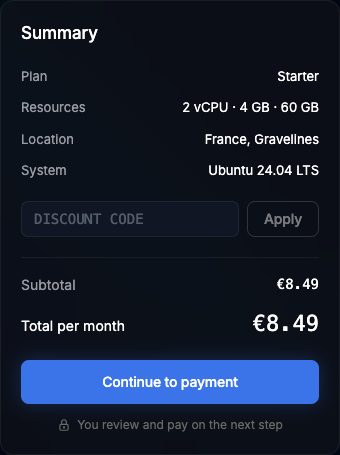
You can enter a discount code when you deploy a virtual server or a game server:
- In the Summary box of the deploy page, type the code in Discount code.
- Click Apply. If the code is valid you see X% off applied and the Discount line in the summary. If not, you see That code is not valid.
- Click Continue to payment. The order is created with the discounted price.
Good to know:
- A code is not valid when it is disabled, expired or has reached its maximum number of uses.
- The discount applies to that first order. Renewal orders are created at the plan price.
- If you cancel the unpaid order, the code use is given back.
- The game protection checkout has no discount code field.
Discount code or referral code?
Support levels
Plans come with one of three support levels: Basic, Advanced or Enterprise. Your account gets the highest level among the plans of your active services, and it is updated automatically when a service is paid, suspended or removed. With no active service, your level is Basic.
Where you see it:
- Tickets, section Your support plan: your current level and what each level includes.
- Account > Account: the badge next to your name (Basic support, Pro support for Advanced, or Enterprise support).
- On each ticket, Reply time shows the usual reply time for your level.
Changing plan
There is no plan change button for an active service.