
Server Icon & Resource Pack
Two things players see before they spawn:
- The server icon, the 64x64 picture next to your server in the multiplayer list. It is in the Settings tab.
- The resource pack the client downloads when it joins. It is in the Options tab.
Neither is shown on Velocity and Waterfall proxies.
Server icon

- Go to Hosting > Game Servers > your server and click the Settings tab.
- Scroll to the Server icon card under the Settings card.
- Click Upload PNG (or Replace if there is already an icon) and pick your file.
- The preview updates when the upload finishes and a message says “Server icon updated.”
Requirements:
| Property | Value |
|---|---|
| Format | PNG |
| Size | Exactly 64x64 pixels |
| File size | Up to 256 KB |
The panel checks the format and size in your browser before uploading, so a wrong file is rejected at once with “Server icon must be a PNG.” or “Server icon must be exactly 64x64.”
The icon is saved as server-icon.png in the root of the server. The refresh icon reloads the preview, and Remove deletes the icon. Minecraft reads the icon when it starts, so restart the server to show a new one.
Resource pack
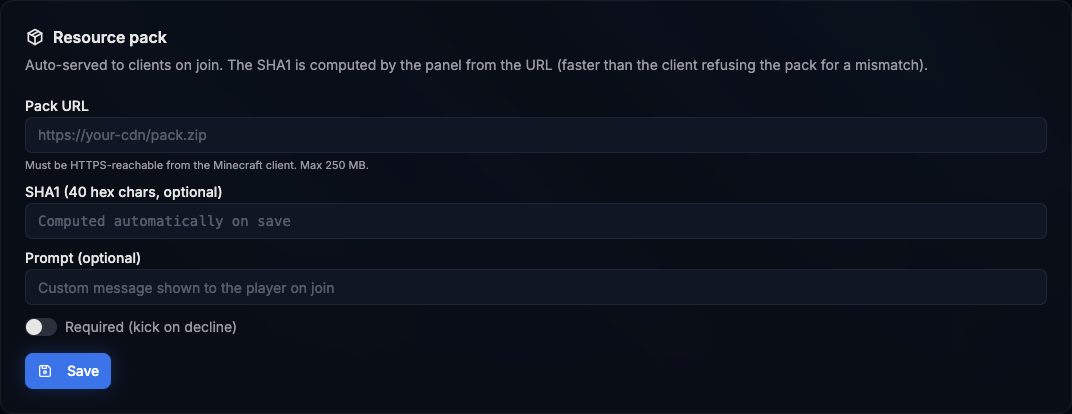
- Go to Hosting > Game Servers > your server and click the Options tab.
- Scroll down to the Resource pack card, below the Server options card.
- Fill in the fields:
- Pack URL: the direct link to your
.zip. Players’ clients download it, so it must be reachable from the internet over HTTPS. Up to 250 MB. - SHA1 (optional): the 40 character hash of the file. Leave it empty and the panel downloads the pack and computes it when you save.
- Prompt (optional): the message shown to the player when the pack is offered, up to 200 characters.
- Required (kick on decline): when on, players who refuse the pack are disconnected.
- Pack URL: the direct link to your
- Click Save. The message says “Resource pack saved. SHA1 verified.”
- Restart the server so Minecraft reads the new settings.
If the panel cannot download the pack to hash it, saving fails with “failed to fetch pack; supply sha1 manually”. Compute the SHA1 yourself and paste it.
To stop sending a pack, click Clear. It empties all fields and saves.
Update the SHA1 when you change the file
The card writes these keys of server.properties: resource-pack, resource-pack-sha1, resource-pack-prompt and require-resource-pack. You also see them in the Resource pack group of the Options form.