
Firewalls and Game Protection
Everything that protects your services lives in the Security section of the panel sidebar. It has four entries:
| Entry | What it is | Where it opens |
|---|---|---|
| Firewalls | The firewall every virtual server gets. It filters traffic on the host, before it reaches the server | /panel/remote-protection?type=edge |
| Game protection | A paid service for FiveM, RedM, Rust and Minecraft servers hosted anywhere. Players connect to a protected address and PlaySafe forwards clean traffic to your server | /panel/remote-protection?type=game |
| Attacks | Every attack detected on your firewalls and game protections, plus where alerts are sent | /panel/alerts |
| Reports | Scheduled email or Discord summaries of the attacks | /panel/remote-protection/digests |
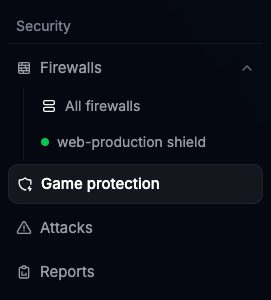
Firewalls and Game protection share one list page with two filters at the top, Firewalls and Game protection, each with its count. Under each sidebar entry you also get a shortcut to every firewall or protection you have.
Firewalls (virtual servers)
You do not buy a firewall. When a virtual server is delivered, PlaySafe creates its firewall automatically, named after the server (for example web-production Firewall). It renews and expires together with the server.
From Security > Firewalls > your firewall you can:
- Add allow and block rules by port and source address
- Block or allow whole countries
- Keep lists of IPs that are always allowed or always blocked
- Turn on ready-made protections (packet validation, rate limits, SYNPROXY and more)
- Share the firewall with another PlaySafe user, and export or import its rules
The same firewall is linked from the server page: Hosting > Virtual Servers > your server > Network, button Open firewall.
Game protection
Game protection is for a game server you run anywhere, on PlaySafe or elsewhere. You deploy it from Security > Game protection > Deploy new, choose the game and a plan, and enter the public IPv4 address of your server (the backend IP). After payment:
- PlaySafe gives the protection a protected IP. FiveM and RedM also get a player connect address like
your-slug-svr.playsafe.dev. - Players connect to that address instead of your server’s real IP.
- Traffic is filtered by PlaySafe and the clean part is forwarded to your backend IP.
Each protection lasts 30 days and is renewed from the panel. The filtering rules of a game protection are managed by PlaySafe; to change them, open a ticket.
Keep your backend IP private