
Server Types
When you deploy a Minecraft server you pick a server type. It decides which server software runs and which tabs the panel shows for it.
- Go to Hosting > Game Servers > Deploy new.
- Under Game, pick Minecraft.
- Under Plan, pick a plan.
- Under Server type, pick one of the cards below. Each card shows a short description of the software.
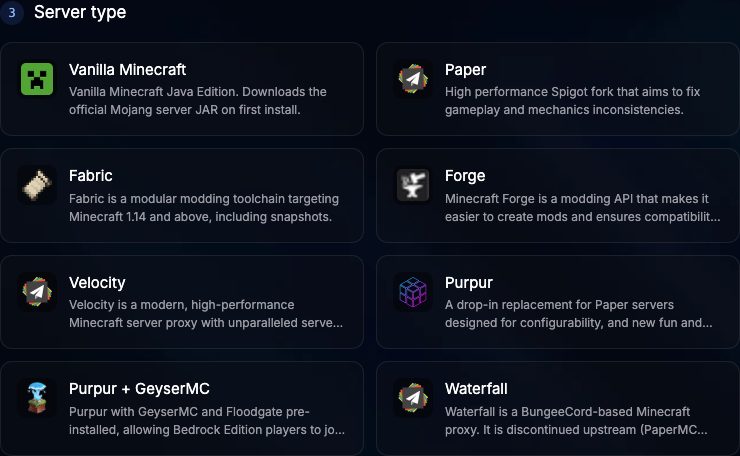
The server type is chosen once, at deploy time. The panel has no option to switch an existing server to another type: deploy a new server with the type you want and copy your world over with the Files tab.
At a glance
| Server type | Players, Options, Access, Crash reports | Mods tab | Proxy tab | Bedrock clients |
|---|---|---|---|---|
| Vanilla Minecraft | Yes | No | No | No |
| Paper | Yes | Plugins | No | No |
| Purpur | Yes | Plugins | No | No |
| Purpur + GeyserMC | Yes | Plugins | No | Yes |
| Fabric | Yes | Mods | No | No |
| Forge | Yes | Mods | No | No |
| Velocity | No | No | Yes | No |
| Waterfall | No | No | Yes | No |
The Server icon card in the Settings tab is also available on every type except Velocity and Waterfall.
Vanilla Minecraft
The official Mojang server, downloaded on first install. No plugins and no mods. The Players, Options, Access and Crash reports tabs still work because they edit standard Minecraft files.
Paper
A high performance fork of Spigot that runs Spigot and Bukkit plugins. Install plugins from the Mods tab; they go into plugins/.
Purpur
A drop-in replacement for Paper with many extra configuration options. It runs the same plugins as Paper.
Purpur + GeyserMC
Purpur with GeyserMC and Floodgate already installed, so Bedrock Edition players can join your Java server.
Fabric
A lightweight mod loader. Install Fabric mods from the Mods tab; they go into mods/.
Forge
The mod loader used by most large modpacks. Install Forge mods from the Mods tab; they go into mods/. Large modpacks need more memory, so check the requirements of the pack before picking a plan.
Velocity
A modern proxy that sits in front of several Minecraft servers and lets players move between them. Configure it in the Proxy tab. Velocity servers do not get the Mods, Players, Options or Access tabs.
Waterfall
A BungeeCord based proxy. PaperMC no longer develops it, so choose Velocity for new networks and keep Waterfall for setups that need BungeeCord style forwarding. Configure it in the Proxy tab.
Pinned builds and recovery
PlaySafe pins tested builds of Paper, Purpur, Fabric, Forge, Velocity and Waterfall, so a server deployed today and one deployed next month start the same way even if a newer upstream build appears.
Before each start, the panel also checks a Minecraft server for common damage: an empty or corrupted level.dat is moved aside (and level.dat_old restored when it looks healthy), and on Paper based servers, config files written by a newer build are moved aside so the server can boot. Before a reinstall, old install files are cleaned up while your worlds, plugins, server.properties, eula.txt and player lists stay. Files moved aside are kept in a .broken-... folder inside the world or config folder, which you can open in Files.