
Server Page and Overview Tab
Open a server from Hosting > Game Servers > your server (or click its card in All servers). The page has a header that stays the same on every tab, a row of tabs, and the Overview tab open by default.
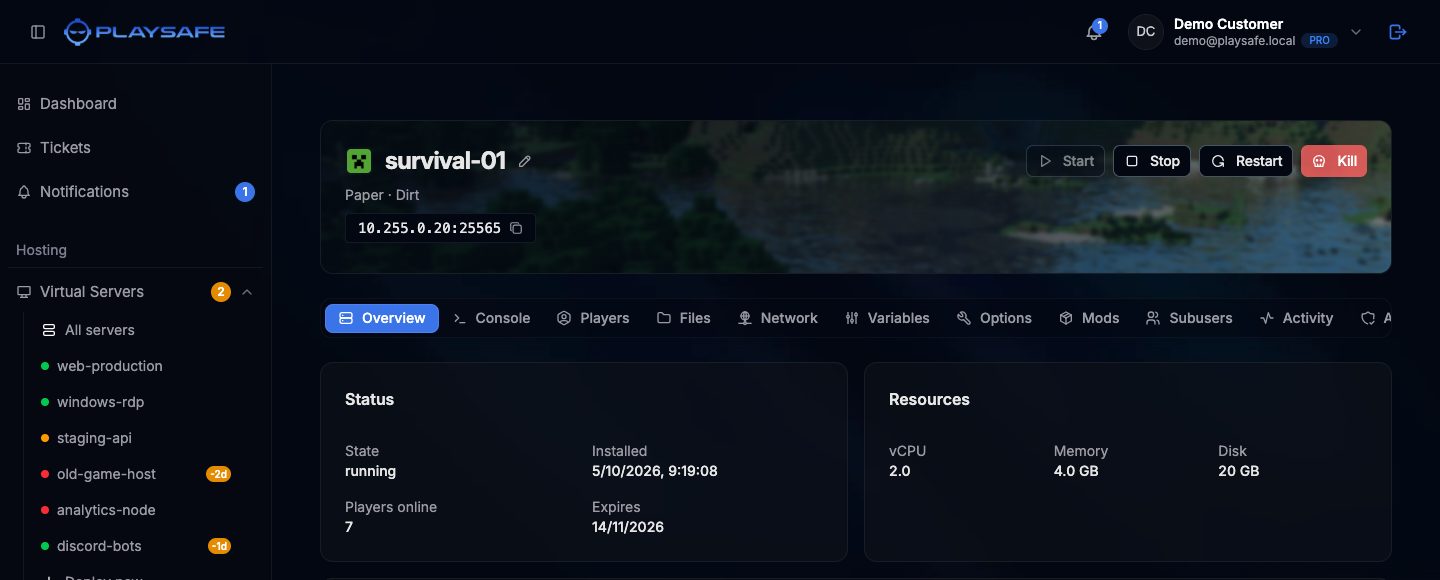
Header
- The game icon and the server name. Click the pencil next to the name, type the new name and press Enter (or the check button) to rename it. Only the owner can rename a server.
- Status badges. A live badge shows Online, Starting, Stopping or Offline (or Connecting while the panel reaches the server). A second badge appears only for states that need your attention, such as pending, installing, suspended or failed.
- The server type and plan, for example
Paper · Dirt. - The connection address
IP:Port. Click it to copy it.
Power buttons
The four buttons on the right of the header control the server. Each one is only enabled when it makes sense:
| Button | Enabled when | What it does |
|---|---|---|
| Start | The server is offline | Starts the server. |
| Stop | The server is running or starting | Stops the server cleanly. |
| Restart | The server is running | Stops and starts the server. |
| Kill | The server is not offline | Ends the server process at once. Use it only when Stop does not work. |
All four are disabled while the server is pending, installing, suspended or failed. Subusers need the matching permission (control.start, control.stop for Stop and Kill, control.restart).
Kill is a last resort
Tabs
Every server has these tabs: Overview, Console, Files, Network, Variables, Subusers, Activity, Backups and Settings. Some games add their own:
| Server type | Extra tabs |
|---|---|
| Minecraft (Vanilla, Paper, Purpur, Fabric, Forge) | Players, Options, Access, Crash reports, and Mods on every type except Vanilla |
| Minecraft proxies (Velocity, Waterfall) | Proxy |
| Counter-Strike 2 | Players, CS2 Settings, Workshop, RCON |
| Rust | Players, Server settings, Wipes, and Plugins on modded (Carbon) servers |
| Hytale | Players, Plugins, Server settings |
If the row of tabs is wider than the page, scroll it sideways to reach the last ones.
Overview tab
Status card:
- State: the current state of the server.
- Installed: when the installation finished, or “pending”.
- Players online: how many players are connected (not shown on Counter-Strike 2).
- Expires: the date the current paid month ends.
Resources card: the vCPU, Memory and Disk of your plan.
Below these cards each game adds a live card while the server is running: Connected players on Minecraft, and a live status card on Counter-Strike 2, Rust and Hytale. When the server is stopped the card says so and stays empty.
If the setup of the server failed, a red Provisioning failed card shows the Reason and, when available, a Detail line. Open a ticket from Tickets and include that text, or cancel the server from Settings > Cancel order.