
Settings
The Settings tab holds the actions that change the server itself. Open it from Hosting > Game Servers > your server > Settings. Only the server owner can use these actions; subusers get an error if they try.
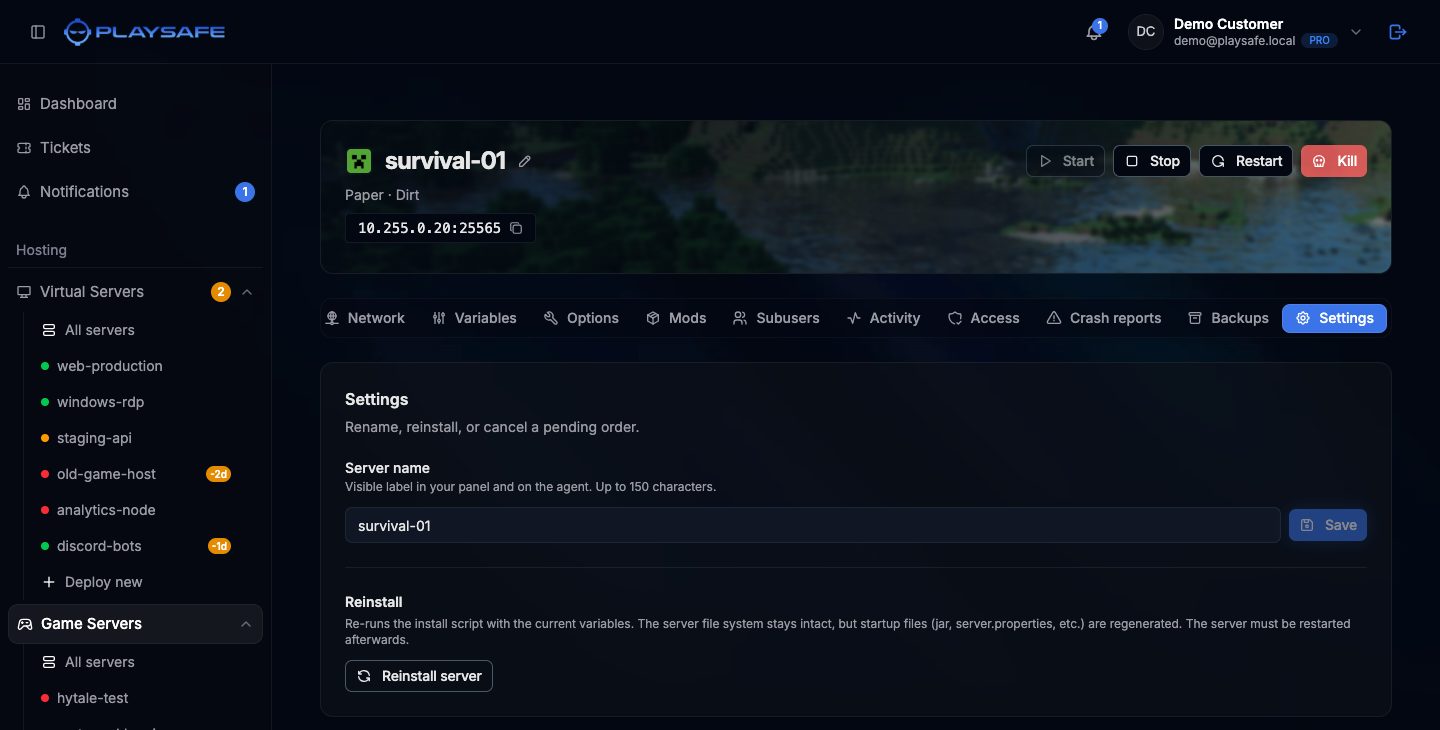
Rename the server
- Type the new name in Server name (up to 150 characters).
- Click Save or press Enter.
The name is only a label in your panel; it does not change what players see in the game. You can also rename from the pencil next to the name in the header.
Reinstall the server
A reinstall runs the installation again with the current values of the Variables tab. Your files stay in place, but the files the installer creates (such as the server jar or server.properties on Minecraft) are generated again. Use it after changing the game version, or when the installation went wrong.
- Take a backup first if you care about the current files.
- Click Reinstall server.
- Confirm with Reinstall. The server is unreachable for a few minutes.
- When it is back, start it with the Start button in the header.
A server that failed before it was ever set up cannot be reinstalled. Cancel it and deploy it again.
Cancel an order
The Danger zone section with Cancel order only appears while the server is pending (the order was not paid yet) or failed. Cancelling marks the order as cancelled and frees what was reserved for the server. It cannot be undone; to try again you deploy a new server.
- Click Cancel order.
- Confirm with Cancel order (or Keep order to go back).
To stop a server that is already running and paid, do not renew it: see Renewals. For anything else, open a ticket from Tickets.
Server icon (Minecraft)
Minecraft servers show an extra Server icon card under Settings, to upload the 64×64 PNG shown in the Minecraft server list. See Appearance.